curl for iPhone (2026): Making HTTP Requests from iOS
Short version. iOS has no shell and no curl binary, so you cannot type a curl command on an iPhone. What you can do is send the same request from a native app: choose the method, set your own headers, supply a body, and read the full response including the redirect chain. PingKit's HTTP Analyzer does that free.
You are away from your desk, an API is misbehaving, and you want to check what it actually returns. On a laptop that is one curl command. On an iPhone there is no shell to type it into.
Full disclosure: I build PingKit, so weigh the recommendation accordingly. The limits section below is not padding, and the point of these pages is to tell you when the answer is "use a computer".
Why There Is No curl on iOS
iOS gives apps no shell and no way to execute arbitrary binaries. There is no Terminal, and an app cannot download and run a command line tool. That is a deliberate part of the security model and not something an entitlement unlocks.
Ironically, curl's underlying library ships inside iOS and macOS as part of the system networking stack. You just cannot reach it as a command.
Mapping curl Flags to What an App Can Do
| curl | Available on iPhone? |
|---|---|
-X POST and other methods | Yes: GET, POST, PUT, DELETE, PATCH, HEAD, OPTIONS |
-H "Header: value" | Yes, arbitrary custom headers |
-d '{"json":true}' | Yes, request body on POST, PUT and PATCH |
-i (show response headers) | Yes, all response headers |
-L (follow redirects) | Yes, with the full redirect chain shown |
-w '%{time_total}' | Yes, request timing |
-k (skip TLS verification) | No |
--resolve / custom DNS | No |
Piping to jq or a file | No, there is no shell to pipe into |
Using PingKit's HTTP Analyzer
Enter a URL, pick a method, add any headers you need, and paste a body if the method takes one. The response comes back with the status code and message, every response header, the body, its size and MIME type, timing, and the complete chain of redirects if there were any.
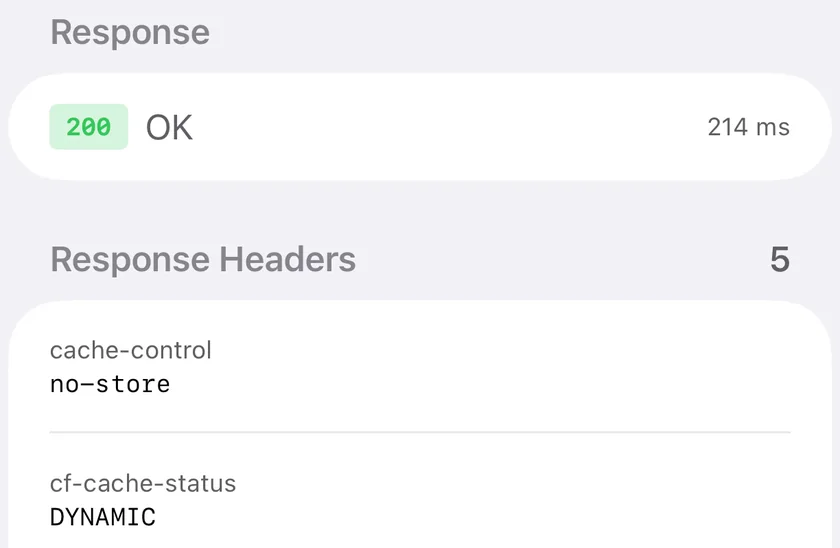
curl -i prints, without the terminal: status line, timing and every response header.Requests can be saved with a name and grouped into collections, so a set of endpoints you check regularly is two taps away rather than retyped each time.
Where this is genuinely better than curl. Testing from a phone means testing from a real mobile network. A response that differs over cellular from what you get on office WiFi is a CDN, geo-routing or captive portal issue, and reproducing that from a laptop on the same LAN is exactly what you cannot do.
Honest Limits
- No skipping TLS verification. There is no equivalent of
-k. A server with a broken or self-signed certificate will fail rather than warn. Use SSL Inspector to see what is wrong with the certificate instead. - Cleartext HTTP to a public hostname is blocked by App Transport Security. Local addresses and
.localnames work;http://to a public domain does not. - No pipelines. Nothing to pipe into. You read the response in the app.
- No client certificates and no custom DNS resolution per request.
Other Options
iSH is an Alpine Linux emulator on the App Store and does provide a shell where curl can be installed. It works for simple requests, though it is slow and network behaviour inside the emulator can surprise you.
Shortcuts has a "Get Contents of URL" action supporting methods, headers and a body. It is clumsy for exploration but genuinely good for a request you want to repeat or automate.
SSH to a real machine from an iOS terminal client remains the most complete answer if you have a server to reach.
Frequently Asked Questions
Can I run curl on an iPhone?
Not as a command. iOS provides no shell and does not let apps execute arbitrary binaries. You can send the same requests from a native app, or install curl inside the iSH Alpine Linux emulator, which works but is slow.
How do I send a POST request from an iPhone?
Use an HTTP client app. PingKit's HTTP Analyzer supports GET, POST, PUT, DELETE, PATCH, HEAD and OPTIONS with custom headers and a request body, and shows the full response including headers and redirect chain. The Shortcuts app can also do it via Get Contents of URL.
Can an iPhone app ignore TLS certificate errors like curl -k?
No. There is no equivalent of curl's -k flag. Requests to servers with invalid certificates fail rather than proceeding with a warning. Inspect the certificate separately to see what is wrong with it.
Why does http:// fail but https:// work on my iPhone?
App Transport Security blocks cleartext HTTP to public hostnames by default. Local network addresses and .local names are permitted. This applies to apps, not to Safari.
Is there a free curl alternative for iOS?
PingKit's HTTP Analyzer is free with no ads or account, supports seven methods with custom headers and bodies, and shows response headers, body, timing and redirects. It is one of 19 free tools in the app.
Send the request from your phone
Seven HTTP methods, custom headers, request bodies, full response headers, timing and redirect chains. Free, no ads, no account.
Download PingKit Free