Best Network Monitoring Apps for iPhone (2026): Which Ones Actually Alert You
Short version. An iPhone app cannot monitor anything while it is closed; iOS does not allow it. So every "monitoring" app on this list either scans when you open it, or relies on something else that stays on: a computer, a box, or a server. Of the five, PingKit is the one that does it without a subscription: the free Mac Agent watches while the Mac is awake, Uptime Watch checks one website from a server with nothing of yours running, and Guardian puts the alerts on your iPhone. Fing is the other, with Fing Desktop, Fing Agent or a Fingbox on a Premium plan. iNet, Network Analyzer Pro and Scany are on-demand scanners, and good ones.
All 19 tools are free on iPhone and PingKit Agent is free on the Mac. Guardian adds the alerts on your iPhone, with a 1-week free trial.
The Test: What Reaches You When the App Is Closed
Every network app on the App Store can scan your Wi-Fi and list the devices on it. That is table stakes, and the differences between them at that job are real but small. The word "monitoring" implies something else: that you will find out when a device drops off, a stranger joins, or the internet goes down, without having the app open at the time.
iOS makes that impossible for an app on its own. An iPhone app gets seconds of background time, not hours, and cannot keep sockets open to your router while it is closed. So any app that alerts you unattended is doing it through something that stays on: a desktop program, a piece of hardware, or a server on the internet. The honest comparison is not "which app has the most tools" but "what does each one need running, and what will it tell you".
The Five Apps
PingKit
Our app, so weigh this section against the four below it. All 19 tools are free to use with no ads and no account: port scanner, ping, traceroute, MTR, DNS, WHOIS, HTTP and SSL inspection, speed test, Wake-on-LAN, a Bonjour browser, a security checkup and more, plus a device scanner on the Devices tab. The monitoring comes from the free PingKit Agent for Mac, which, while your Mac is awake, scans the network every five minutes on mains power by default, raises alerts on the Mac, and runs scheduled speed tests, none of which costs anything. PingKit Guardian, $2.99 a month or $24.99 a year, is what puts those alerts and that data on your iPhone through your private iCloud, and it adds Uptime Watch: checks of a public URL or TCP port from Cloudflare every five minutes, with one URL, checked hourly, free even without Guardian.
Fing
The most-installed network scanner on iOS, with the largest device-identification database in the category. The free tier is limited to three scans a day and carries ads. Fing Premium is $7.99 a month or $69.99 a year and adds continuous monitoring, a full event timeline, device blocking and internet time limits, two monitored networks, and mobile and email notifications; Professional is $16.99 a month or $149.99 a year. Fing's own pricing page is explicit about the condition: "Monitoring requires an active Fing Desktop, Fing Agent or Fingbox for automated scans, checks and reporting." With one of those running and a Premium plan, Fing will tell you when a recognised device goes online or offline, when the internet drops, and when a new device appears.
iNet Network Scanner
A German-made scanner that has been on the App Store since 2010. The free version is ad-free and scans the network; iNet Pro is a $9.99 in-app purchase, and the Mac version is a separate app. It identifies devices, finds services and open ports, and sends Wake-on-LAN packets. Nothing in its listing claims alerts or background monitoring, and it does not need to: it is an on-demand scanner, and an accurate one. If you are weighing it against a free option on both platforms, the iNet Network Scanner alternatives compare it on iPhone and Mac.
Network Analyzer Pro
$3.99, one-time. LAN scan, ping, traceroute, port scan, Wi-Fi signal information and DNS queries in one utility, from a developer that has shipped it for over a decade. No alerts, no monitoring, no subscription. If you want a pocket toolkit and never a notification, this is a fair buy.
Scany
$5.99, one-time. Scany's strength is discovery: it works hard at finding devices that hide, and it lists services in detail. Like the two above it, it makes no claim to watch anything while closed.
Side by Side
| App | Price | Alerts when the app is closed | What it needs running | Best at |
|---|---|---|---|---|
| PingKit | Free (19 tools, no ads); Guardian $2.99/mo or $24.99/yr | Yes: one website free with Uptime Watch; LAN alerts on the Mac free, on the iPhone with Guardian | The free Mac Agent, or nothing for Uptime Watch | Price, free toolkit, website and certificate monitoring |
| Fing | Free (3 scans/day, ads); Premium $7.99/mo or $69.99/yr | Yes, on Premium | Fing Desktop, Fing Agent or Fingbox | Device identification, blocking |
| iNet Network Scanner | Free; Pro $9.99 one-time | No | Nothing | Clean on-demand scanning, ad-free |
| Network Analyzer Pro | $3.99 one-time | No | Nothing | Pocket toolkit |
| Scany | $5.99 one-time | No | Nothing | Finding devices that hide |
What Reaches Your iPhone From PingKit
Being specific, because "smart alerts" on a feature list means nothing. With the free Mac Agent running on a Mac that is awake, these alerts appear on the Mac, and with Guardian in PingKit on your iPhone too: a new device has joined the network; a device has gone unseen for 15 minutes and then stayed offline for 3 scans in a row by default (once Device Offline alerts are turned on in the Agent's settings) and, later, that it is back; the internet connection has dropped and has recovered; a latency threshold you set has been crossed. From Uptime Watch, which needs no Mac at all: a watched URL has stopped answering, and it is answering again; and, once, that a site has started refusing automated checks, so you know it is no longer being measured. From Cert Monitor, for the certificates you add on your iPhone: one is 30, 14, 7 or 1 days from expiry, has expired, or its chain has stopped validating. Your iPhone reads them each time you open Cert Monitor, and a warning goes out only from a reading less than three hours old.
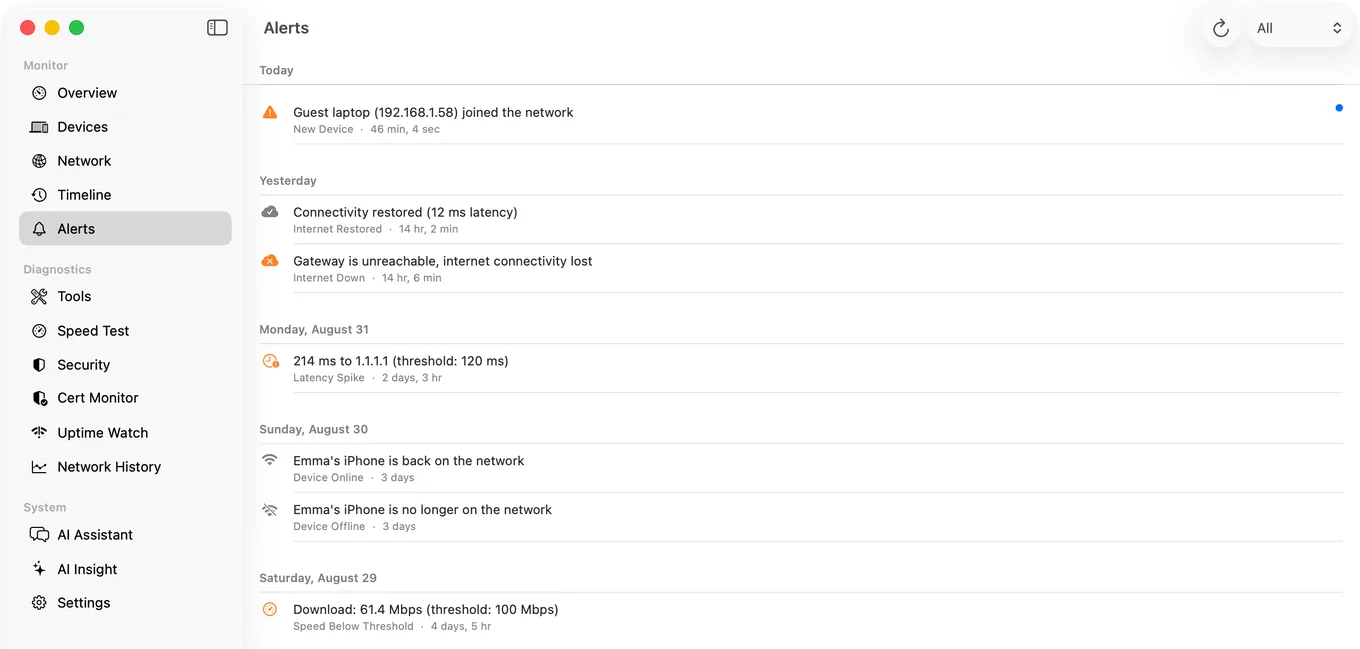
Guardian also sends your iPhone a short weekly report every Monday at 9:00 your time, put together on the phone from what PingKit recorded, and, with PingKit Agent on a Mac that is awake, a morning briefing each day of what changed overnight.
What does not arrive: anything the iPhone would have to discover on its own while closed. The Monitor tab is honest about this in the app, and with Guardian the Agent's alert list is the same list you see on the phone.
Which One to Pick
- You want to be told when a device goes offline or a stranger joins, and you have a Mac that stays on: PingKit with its free Mac Agent, or Fing Premium with Fing Desktop, $7.99 a month. The Fing route also gives you blocking; the PingKit route also gives you website and certificate monitoring and 19 free tools.
- Same, but the computer you leave on is a Windows PC: Fing. PingKit's Agent is Mac only.
- You want a website watched, not a LAN: PingKit's Uptime Watch, one URL free, no Mac needed.
- You want a scanner and never a notification: iNet, Network Analyzer Pro or Scany, one-time purchases all, or PingKit's free tools.
Honest Limits
- PingKit does not block devices or set time limits. It is a diagnostic tool for a network you own, not a parental control.
- PingKit's LAN alerts need a Mac running the Agent. Without one, Guardian still gives you Uptime Watch, trend charts and, on an iPhone with Apple Intelligence, Apple Private Cloud Compute answers, but nothing watches your LAN.
- Uptime Watch checks from the internet, every five minutes on Guardian and hourly on the free URL. It cannot see a device with only a private address.
- Fing's free tier is three scans a day with ads. If you only ever want manual scans, the one-time-purchase apps are better value than either subscription.
Frequently Asked Questions
Can an iPhone app monitor my network in the background?
No. iOS gives apps seconds of background time, not the hours a monitor needs. Every app that alerts you unattended does so through something else that stays on: a desktop program (Fing Desktop, PingKit Agent), a hardware box (Fingbox) or an internet-side service (PingKit's Uptime Watch).
Which network monitoring app for iPhone sends alerts?
Fing, on a Premium plan with Fing Desktop, Fing Agent or a Fingbox running, and PingKit: its free Mac Agent alerts you on the Mac while the Mac is awake, Guardian puts those alerts on your iPhone, and Uptime Watch pushes to your iPhone for one website free. iNet, Network Analyzer Pro and Scany are on-demand scanners and do not claim to alert you.
Is there a free network monitoring app for iPhone?
PingKit's 19 tools are free to use, and its Mac Agent monitors your network and alerts you on the Mac for free while the Mac is awake; Guardian, $2.99 a month or $24.99 a year on iPhone or Mac, brings the Agent's devices and alerts to your iPhone. Uptime Watch monitors one URL free with push on the iPhone and needs no Mac. Fing's free tier scans three times a day with ads and does not monitor.
Does PingKit need a Mac?
For LAN monitoring, yes: a Mac running the free PingKit Agent. For website monitoring with Uptime Watch, no. All 19 diagnostic tools run on the iPhone alone.
What does Fing Premium need to monitor a network?
Fing's pricing page states that monitoring requires an active Fing Desktop, Fing Agent or Fingbox for automated scans, checks and reporting. The iPhone app on its own scans on demand.
Get the alert on your iPhone.
Free to download. Guardian is $2.99 a month or $24.99 a year, with a 1-week free trial on both. Cancel anytime.
Download PingKit for iPhone