WinMTR and PathPing for iPhone (2026): Per-Hop Diagnostics on iOS
Short version. WinMTR and PathPing are Windows-only, but the technique they implement is not. MTR runs on iPhone: it maps the path then keeps probing every hop, reporting latency and packet loss per hop. PingKit includes MTR free, which is uncommon on iOS. The catch is that iOS cannot run it unattended in the background.
When an ISP says the problem is your equipment, per-hop data is how you show otherwise. WinMTR on Windows and PathPing built into Windows both do this. Neither exists on iOS, but MTR does.
Full disclosure: I build PingKit, so weigh the recommendation accordingly. The limits section below is not padding, and the point of these pages is to tell you when the answer is "use a computer".
The Mistake Almost Everyone Makes
Worth putting before anything else, because a misread MTR report is worse than no report.
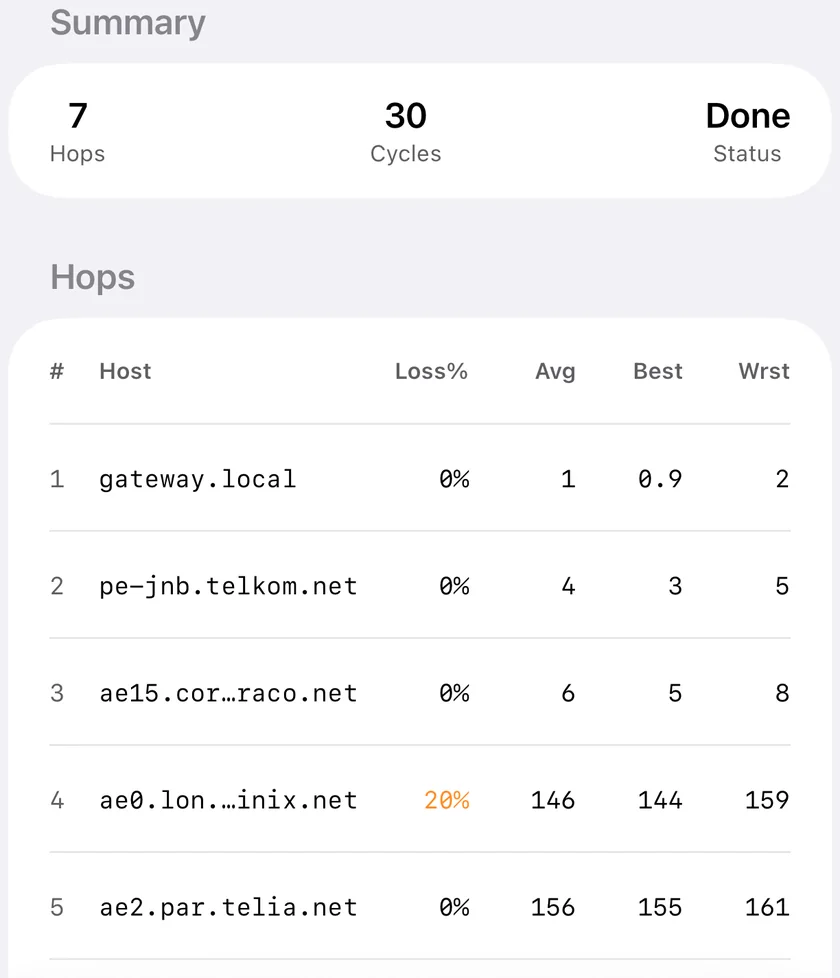
Loss at a middle hop that does not appear at later hops is not a fault. Routers deprioritise generating ICMP replies to probes because forwarding traffic is their actual job. A hop showing 40% loss while every subsequent hop shows 0% is rate limiting its own replies, and it is working correctly.
The pattern that matters is loss that starts at a hop and continues through every hop after it, including the destination. That is real. Anything else is noise, and sending your ISP a screenshot of the first kind is how a support ticket gets closed.
Also worth knowing. High latency at one hop that does not increase downstream is equally harmless. Look at the trend across the whole path to the destination, not at any single row.
WinMTR and PathPing Compared to iOS
| Capability | On iPhone | Notes |
|---|---|---|
| Per-hop latency | Yes | MTR |
| Per-hop packet loss | Yes | MTR |
| Continuous sampling | Yes | While in the foreground |
| Hop hostnames | No | IP addresses only, no reverse DNS |
| Hop geolocation | Yes | In Traceroute |
| Unattended multi-hour runs | No | iOS suspends background apps |
| Export a text report | Yes | Share or screenshot |
The background limitation is the honest dividing line. Building evidence across an evening is exactly what WinMTR is good at, and a phone cannot do it. For that, run WinMTR or command line mtr on a machine that stays awake.
Using It on iPhone
MTR gives the per-hop latency and loss table. Traceroute gives a single path snapshot with geolocation for each hop, which is often the faster way to see that traffic is taking an absurd route. Connection Monitor watches latency, jitter and loss to one target live, which is the right tool when you want to catch a drop as it happens rather than map a path.
All three are free. For continuous unattended monitoring there is a Mac menu bar Agent, which is also free and needs a Mac that stays awake.
Honest Limits
- Hops are IP addresses, not hostnames. There is no reverse DNS step, so you will not see names like
ae-3.border1.lhr.example.net. Traceroute's per-hop geolocation usually answers the same question. - Foreground only. Sampling stops when the app is backgrounded.
- Connection Monitor graphs roughly the last minute and keeps only a summary of the previous run (average, jitter and packet loss), not its full history.
- No latency alerts from the phone. Latency thresholds and drop alerts are a Mac Agent feature, while your Mac is awake; on iPhone, alerts such as Uptime Watch's come from PingKit's servers, which check your sites even while the phone is locked.
Frequently Asked Questions
Is there a WinMTR app for iPhone?
No. WinMTR is a Windows application. The technique it implements, MTR, is available on iOS: PingKit includes MTR free, reporting per-hop latency and packet loss.
Does PathPing exist on iPhone?
No. PathPing is a Windows command. MTR does the same job, combining traceroute with continuous per-hop probing, and it is available in iOS apps.
Why does one hop show packet loss but the destination shows none?
That router is rate limiting its replies to probes rather than dropping traffic. It is normal and correct behaviour. Only loss that continues from a hop through to the final destination indicates a real problem.
Can I run MTR on my iPhone overnight to collect evidence?
No. iOS suspends apps in the background, so sampling stops when the app is not in the foreground. Long unattended runs need WinMTR or command line mtr on a computer that stays awake.
Does PingKit show hostnames for each hop?
No. Hops are shown as IP addresses with latency, and Traceroute adds geolocation per hop. There is no reverse DNS lookup in the path analysis.
Find the hop that is actually failing
MTR with per-hop latency and loss, traceroute with hop geolocation, and a live connection monitor. Free, no ads.
Download PingKit Free