WiFiman Alternatives for iPhone (2026): An Honest Comparison
Short version. Before comparing apps, one thing needs saying: no iPhone app can show WiFi signal strength, channel or band for the networks around you. iOS does not expose it, to WiFiman or to anyone else. Once that is off the table, the real differences between iOS network apps are device discovery quality, tool breadth, ads and price. PingKit competes on breadth: 19 tools, free, no ads.
WiFiman is Ubiquiti's free network app and it is genuinely well made. People look for alternatives usually because they want more diagnostic tools, or because they are not in the Ubiquiti ecosystem and want something vendor-neutral.
Full disclosure: I build PingKit, so weigh the recommendation accordingly. The comparison below is written to stay useful even if you pick something else, and the limits section is not padding. Competitor features and pricing change, so check the current listing before you decide.
The Thing Nobody Says Out Loud
Search results for "WiFi analyzer iPhone" are full of apps promising channel graphs and signal heatmaps. On iOS this is mostly not deliverable, and it is worth understanding why before you judge any app harshly.
Apple does not provide a general-purpose API for WiFi signal strength. The one interface that exposes it, NEHotspotNetwork, only returns a real value to apps holding the hotspot helper entitlement, which Apple grants exclusively to carrier and hotspot-onboarding apps. Every other app receives a placeholder. There is no channel or band information available either.
So an iOS app showing you a signal strength number is either using that placeholder or estimating it from something else. This constrains every app on the platform equally, mine included. Where a network app offers channel selection, that generally comes from managing the access point through its own ecosystem rather than from reading the phone's radio.
What to do instead. Measure the link rather than the radio. Latency, jitter and packet loss to your router tell you whether the connection is actually bad, and they catch interference and congestion that a signal bar would miss. A full-strength signal with 200 ms of jitter is a bad connection, and only the second measurement tells you.
Where the Real Differences Are
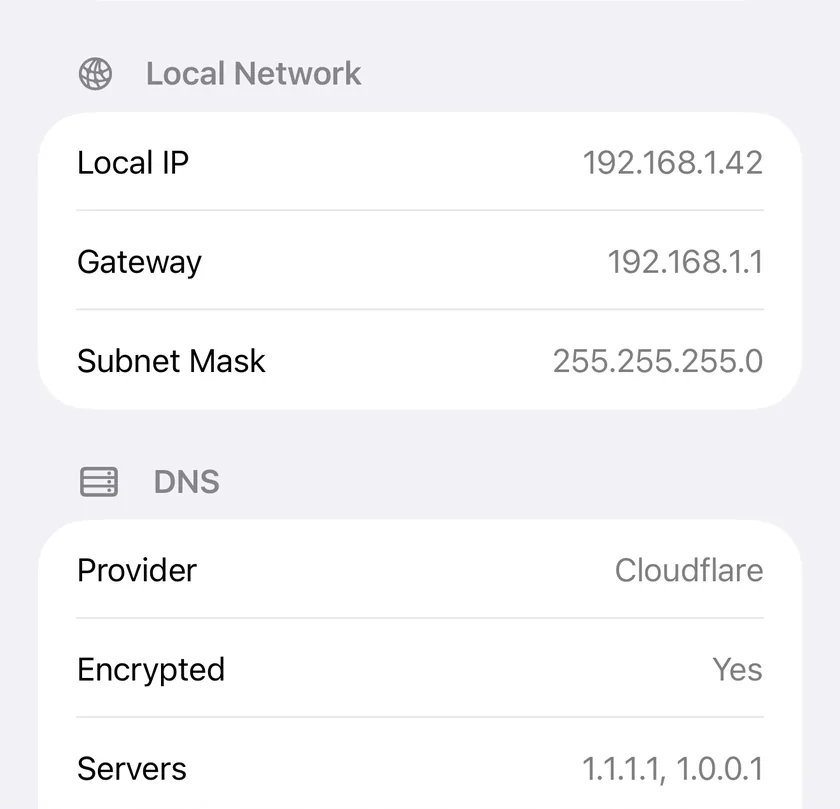
What PingKit reports instead is the part iOS does hand over, in the My Network screen: local IP, gateway, subnet mask, the DNS resolvers in use, and the public IP with its ISP and ASN.
| WiFiman | PingKit | |
|---|---|---|
| Price | Free | Free, optional subscription |
| Ads | No | No |
| Account required | No | No |
| Device discovery | Yes | Yes |
| Speed test | Yes | Yes |
| Bluetooth discovery | Yes | No |
| Traceroute / MTR | No | Yes |
| DNS lookup / WHOIS | No | Yes |
| TLS certificate inspection | No | Yes |
| HTTP response analysis | No | Yes |
| Wake-on-LAN | No | Yes |
| Vendor ecosystem tie-in | Ubiquiti | None |
WiFiman is focused and does its subset well. PingKit is a broader toolkit: 19 tools covering discovery, path analysis, name resolution, certificates and HTTP, which matters if you are diagnosing rather than just looking.
Honest Limits on PingKit
- No WiFi signal strength, channel or band. As above, this is a platform limit rather than a roadmap item. It will not arrive later.
- No Bluetooth scanning. WiFiman does this and PingKit does not.
- Connection Monitor is foreground-only, with a rolling window of roughly the last minute. It is a live diagnostic, not an overnight logger.
- The DNS tool uses your system resolver. There is no in-app resolver picker, so comparing providers means changing DNS in iOS Settings between runs.
Which Should You Pick?
You run Ubiquiti gear: WiFiman, comfortably. The ecosystem integration is the point.
You want more diagnostic depth, vendor-neutral: PingKit gives you path analysis, DNS, TLS and HTTP tools that WiFiman does not attempt.
You specifically want channel and signal graphs: you need a laptop. macOS and Windows expose that data; iOS does not.
Frequently Asked Questions
Why can't iPhone apps show WiFi signal strength?
iOS has no general-purpose API for it. The NEHotspotNetwork interface only returns a real signal value to apps holding the hotspot helper entitlement, which Apple grants only to carrier and hotspot-onboarding apps. Every other app receives a placeholder value, so no App Store app can display real signal strength.
Is WiFiman available on iPhone?
Yes, Ubiquiti publishes WiFiman for iOS. Its iOS build is more limited than the Android version, largely because of the platform restrictions on WiFi radio information described above.
What is the best WiFiman alternative on iPhone?
It depends what you need. For broader diagnostics, PingKit offers 19 free tools including traceroute, MTR, DNS, WHOIS, TLS inspection and HTTP analysis. Fing is the best known alternative for device discovery. None of them can show WiFi channel or signal data on iOS.
How do I check my WiFi quality on iPhone if signal strength is unavailable?
Measure the connection instead of the radio. Run a continuous latency test against your router and watch jitter and packet loss. That tells you whether the link is actually degraded, and it catches interference and congestion that a signal reading would miss.
Does PingKit require an account?
No. The 19 tools work with no account and no sign-up. There is an optional Guardian subscription that puts the free Mac Agent's monitoring on your iPhone and adds AI features, but nothing requires registration to use the free tools.
Nineteen tools, no ads, no account
Device discovery, speed test, ping, traceroute, MTR, DNS, WHOIS, TLS and HTTP inspection. Free on iPhone and iPad.
Download PingKit Free