Net Analyzer Alternatives for iPhone (2026): What to Use Instead
Short version. Net Analyzer is a long-standing iOS network toolkit. The main reasons people look elsewhere are price and wanting specific tools it does not include. PingKit is the free option with the widest tool coverage: 19 tools including MTR, TLS inspection and HTTP analysis, no ads and no account.
Net Analyzer has been a solid iOS network toolkit for years. If you are looking at what else is available, the useful question is not which app is best overall but which one carries the specific tool you keep reaching for.
Full disclosure: I build PingKit, so weigh the recommendation accordingly. The comparison below is written to stay useful even if you pick something else, and the limits section is not padding. Competitor features and pricing change, so check the current listing before you decide.
Match the Tool to the Problem
| What you are trying to do | Tool you need |
|---|---|
| See what is on the network | LAN scanner with device identification |
| Check whether a service is reachable | TCP port scanner |
| Work out where latency comes from | MTR, or traceroute at minimum |
| Diagnose an intermittent drop | Continuous latency and loss monitoring |
| Check a domain's DNS records | DNS lookup with record type selection |
| Check when a certificate expires | TLS certificate inspection |
| See why a URL returns the wrong thing | HTTP response and header analysis |
| Wake a sleeping machine | Wake-on-LAN |
Most iOS network apps cover the first three rows. Fewer cover the rest, and that is usually where the decision actually gets made.
Where PingKit Differs
PingKit carries 19 tools, all free with no ads and no account:
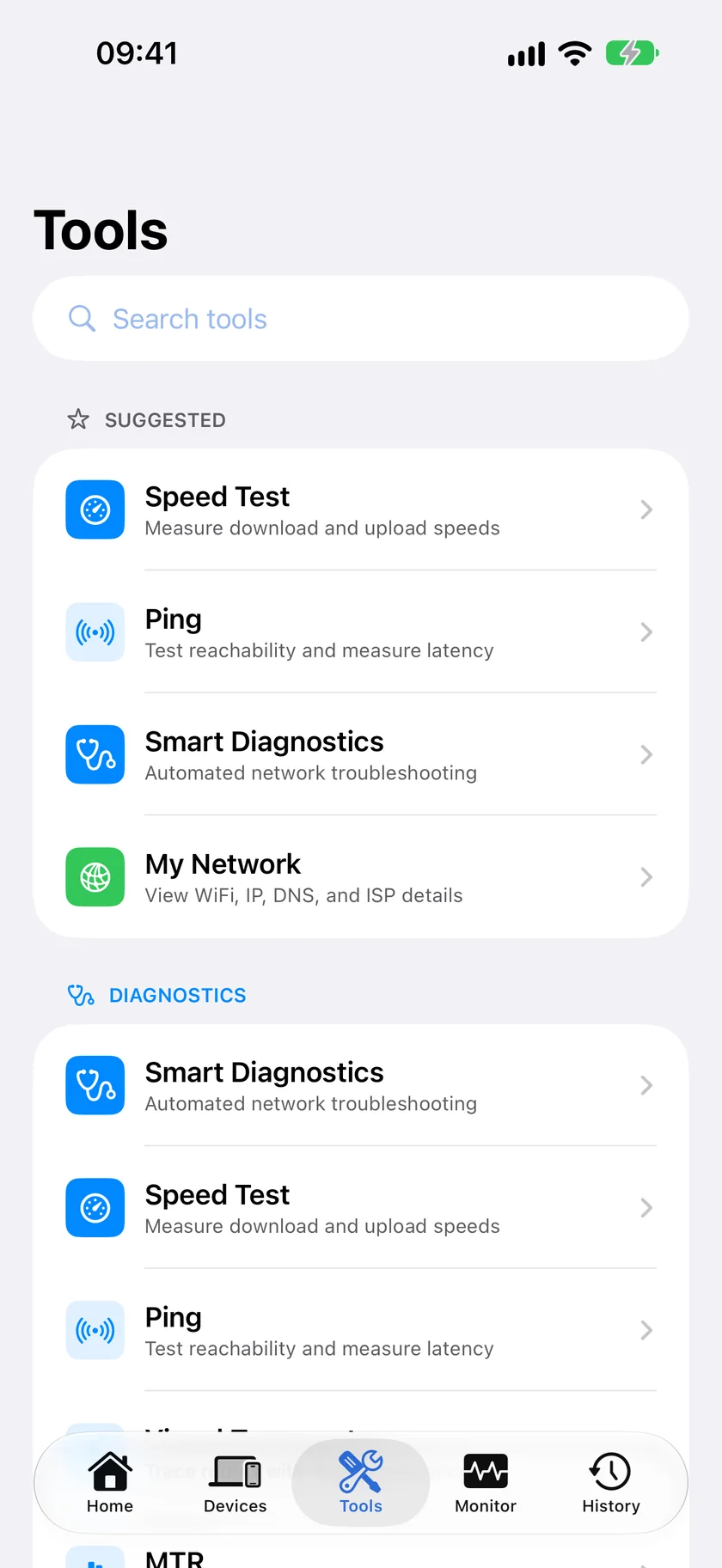
- Path analysis: Ping, Traceroute and MTR. MTR in particular is uncommon on iOS and is the right tool for finding which hop is losing packets.
- Discovery: LAN Scanner, Port Scanner and a Bonjour browser that shows the TXT records a service advertises.
- Web and certificates: SSL Inspector for the certificate chain and expiry, and HTTP Analyzer for status codes, headers and redirects.
- Name and address: DNS Lookup, WHOIS and IP Geolocation.
- Connection health: Connection Monitor for live latency, jitter and packet loss, and a Speed Test.
Honest Limits
- Connection Monitor is foreground-only with a rolling window of roughly the last minute. It shows a problem while it is happening; it does not log overnight.
- Traceroute and MTR show each hop's IP address and latency, and Traceroute also places each hop it can locate on a map with its city and network operator. There is no reverse DNS lookup, so hops are not named.
- DNS Lookup uses your system resolver. No in-app picker, so comparing DNS providers means changing the setting in iOS between runs.
- SSL Inspector shows the certificate chain, expiry, subject, SANs and signature algorithm. It does not report the negotiated TLS version or cipher suite.
- WHOIS on an IP returns geolocation-style data, not RDAP network ranges or abuse contacts.
- No WiFi channel, band or signal strength. iOS does not expose these to any app.
Which Should You Pick?
You already own Net Analyzer and it does what you need: there is no strong reason to switch.
You want MTR, certificate checking or HTTP analysis: those are the gaps PingKit fills, and trying it costs nothing.
You want the deepest device-name database: Fing still leads there, with ads as the trade-off.
Frequently Asked Questions
What is the best free alternative to Net Analyzer on iPhone?
PingKit offers 19 free tools with no ads or account, including LAN scanning, TCP port scanning, ping, traceroute, MTR, DNS, WHOIS, TLS certificate inspection, HTTP analysis and Wake-on-LAN.
Which iOS network app has MTR?
MTR is uncommon on iOS. PingKit includes it free. MTR combines traceroute and continuous ping so you can see which hop along the path is introducing latency or losing packets, which a single traceroute run cannot show.
Can iPhone network apps monitor a connection in the background?
Not continuously. iOS suspends apps in the background, so live connection monitoring only runs while the app is in the foreground. Continuous monitoring needs a device that stays awake, such as a Mac running a companion app.
Do these apps show WiFi channel and signal strength?
No iOS app can. Apple does not expose WiFi radio information to App Store apps, so channel, band and signal strength are unavailable regardless of which app you choose.
Is PingKit's WHOIS a real WHOIS lookup?
For domains it returns registration data. For IP addresses it returns geolocation-style information such as country, region, ISP and ASN rather than RDAP network ranges and abuse contacts, which is worth knowing if you need registry-level detail.
Nineteen tools, none of them locked
Ping, traceroute, MTR, LAN and port scanning, DNS, WHOIS, TLS, HTTP and more. Free on iPhone and iPad, no ads, no account.
Download PingKit Free