dig and nslookup for iPhone (2026): DNS Lookups from iOS
Short version. iOS has no shell, so neither dig nor nslookup exists as a command. A native app covers the common cases: PingKit queries nine record types free. The one thing it cannot do is aim the query at a specific resolver, which is what dig @8.8.8.8 is for, because iOS always uses the system resolver.
Checking whether a DNS change has propagated, confirming an MX record, or reading an SPF entry are all one command on a computer. On an iPhone there is no command line to type into, but the lookups themselves are perfectly possible.
Full disclosure: I build PingKit, so weigh the recommendation accordingly. The limits section below is not padding, and the point of these pages is to tell you when the answer is "use a computer".
Which Record Types You Can Query
PingKit's DNS Lookup supports nine types, which covers essentially everything people reach for dig to check:
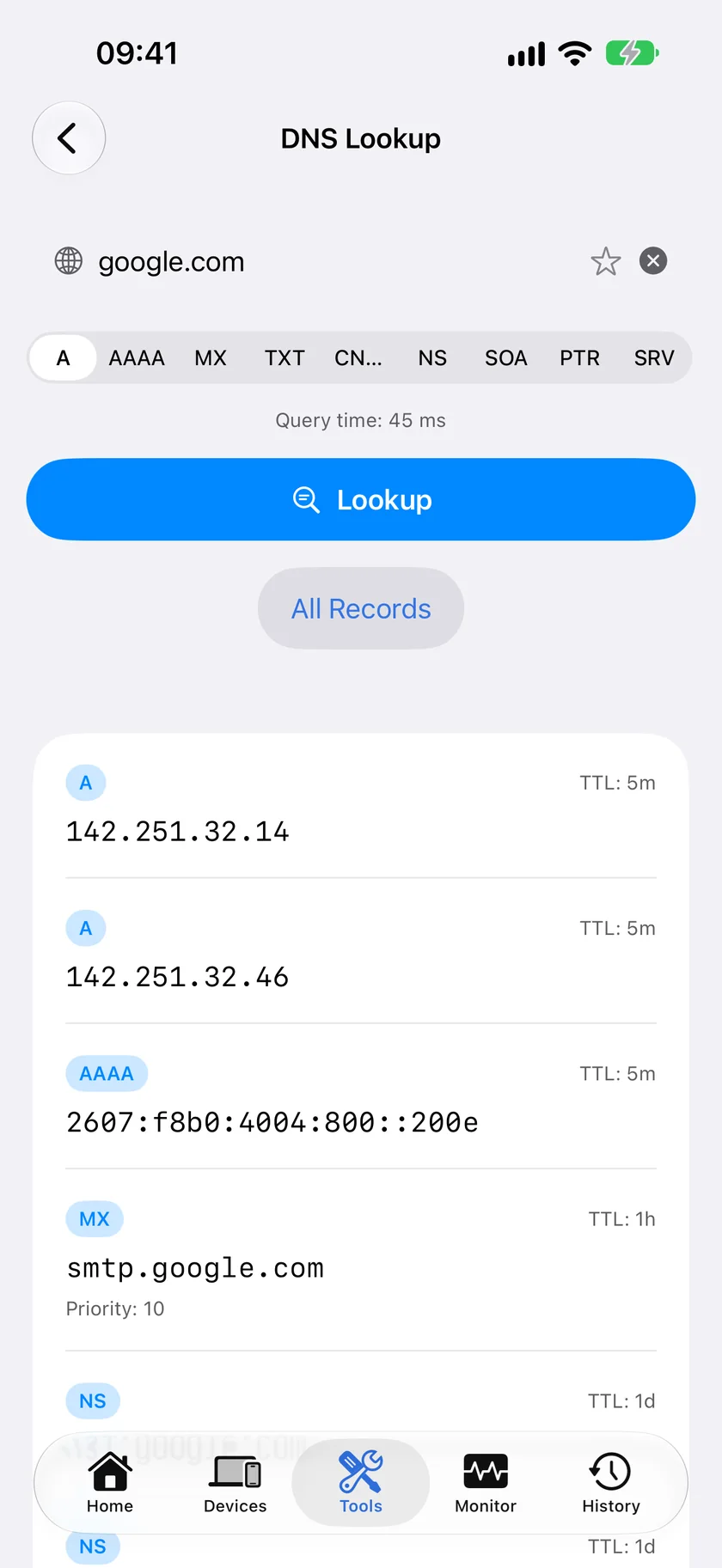
@resolver, which the next section is about.| Type | What it tells you |
|---|---|
| A | IPv4 address for a hostname |
| AAAA | IPv6 address |
| CNAME | The alias target |
| MX | Mail servers and their priorities |
| TXT | SPF, DKIM, DMARC and verification records |
| NS | Authoritative nameservers |
| SOA | Zone serial and timers |
| PTR | Reverse lookup, IP to name |
| SRV | Service location records |
The One Real Gap: No @resolver
The single most useful dig idiom is aiming a query at a specific server: dig @8.8.8.8 example.com, then dig @1.1.1.1 example.com, to see whether a change has reached one resolver but not another.
Standard name resolution on iOS goes through the system resolver, and there is no supported way to point an ordinary lookup at a server of your choosing. An app can work around this by querying a resolver over DNS-over-HTTPS, which is just an HTTPS request, so per-query resolver selection is achievable and some apps do offer it. PingKit does not. Its DNS tool uses the system resolver only, so comparing providers means changing the setting in iOS.
The workaround. Change the DNS server in iOS Settings, WiFi, your network, Configure DNS, then run the lookup again. It is clumsier than @8.8.8.8 but it genuinely tests a different resolver. Remember to change it back.
dig Flags and Their iPhone Equivalents
| dig | On iPhone |
|---|---|
dig example.com | Yes, A record lookup |
dig example.com MX | Yes, and eight other types |
dig -x 1.2.3.4 | Yes, PTR lookup |
dig @1.1.1.1 ... | No, change system DNS instead |
dig +trace | No |
dig +dnssec | No |
dig ANY | No, query types individually |
What Else Is Worth Having Alongside
DNS questions rarely arrive alone. WHOIS tells you who registered a domain and when it expires. SSL Inspector shows the certificate the resolved host actually presents, which is how you catch a DNS record pointing at the wrong server. Ping and MTR confirm whether the resolved address is reachable at all.
Honest Limits
- No resolver selection. PingKit uses the system resolver only. This is a product choice rather than a hard platform limit, since DNS-over-HTTPS would allow it.
- No
+trace, so you cannot walk the delegation chain from the root. - No DNSSEC validation output.
- No zone transfers, which is normal and correct.
- WHOIS on an IP address returns geolocation-style data (country, region, ISP, ASN) rather than RDAP network ranges and abuse contacts.
Frequently Asked Questions
Is there a dig command for iPhone?
No. iOS has no shell, so dig and nslookup do not exist as commands. Native apps can perform the same DNS queries. PingKit's DNS Lookup supports A, AAAA, CNAME, MX, TXT, NS, SOA, PTR and SRV records free.
Can I query a specific DNS server from my iPhone, like dig @8.8.8.8?
Not with PingKit. Ordinary name resolution on iOS goes through the system resolver, and PingKit's DNS tool uses it exclusively, so the workaround is to change the DNS server in Settings, WiFi, Configure DNS and run the lookup again. An app can reach a specific resolver over DNS-over-HTTPS, which is an ordinary HTTPS request, so some apps do offer resolver selection that way.
How do I check if DNS has propagated from my phone?
Look up the record, then change your device DNS in iOS Settings to a different public resolver and look it up again. If the answers differ, the change has reached one resolver and not the other. Online propagation checkers query many resolvers at once and are better for a broad view.
How do I check an SPF or DMARC record on iPhone?
Query the TXT record type for the domain. SPF records start with 'v=spf1'. DMARC lives at the _dmarc subdomain, so query TXT for _dmarc.example.com.
Can iPhone do reverse DNS lookups?
Yes. Query the PTR record type with the IP address to get the hostname associated with it, which is the equivalent of dig -x.
Nine record types, free
A, AAAA, CNAME, MX, TXT, NS, SOA, PTR and SRV lookups, plus WHOIS, certificate inspection and 16 more tools.
Download PingKit Free