Small Business Network Documentation Without an IT Department
Short version. Most small businesses have no record of their own network, and find out at the worst moment: an insurance form, a client questionnaire, a new laptop that cannot print, or a break-in on the accounts of someone who left. You can fix that from a phone in ten minutes. PingKit's LAN scan lists everything answering on the network, and the Network Report PDF, which is free on the iPhone, turns it into a dated document covering your connection, devices, speed and latency history, security summary, certificates, uptime targets and recorded events. With Guardian, the PDF also lists the cameras your last Security Scan found and the port forwards your router last reported to Router mode, and your iPhone shows the history a Mac Agent has been keeping; Guardian Plus adds a signed compliance PDF and scheduling.
What "Documentation" Means for a Business With Six People
Not a network diagram in a drawing tool. At this size, useful documentation answers four questions, and the fifth one is the reason anybody ever writes it down.
- What is on the network? A list of devices with addresses, names and, where the device publishes one, a brand.
- How does it reach the internet? The gateway, the subnet, the DNS provider, the public address and who the ISP is.
- What is normal? Typical speed and latency, so "the internet is slow today" can be tested rather than argued about.
- What changed? A second document, a month later, that you can compare with the first.
- Can you show someone? An insurer, an auditor, a client's security questionnaire, or a contractor who needs to know what they are walking into.
Step 1: Take the Inventory
Open PingKit on the iPhone, go to the Devices tab and tap Scan Network. It sweeps the subnet and lists everything that answers, naming a brand wherever the device publishes one over Bonjour or SSDP. Give the scan a minute, and do it in the middle of a working day when everything is switched on rather than at 7am.
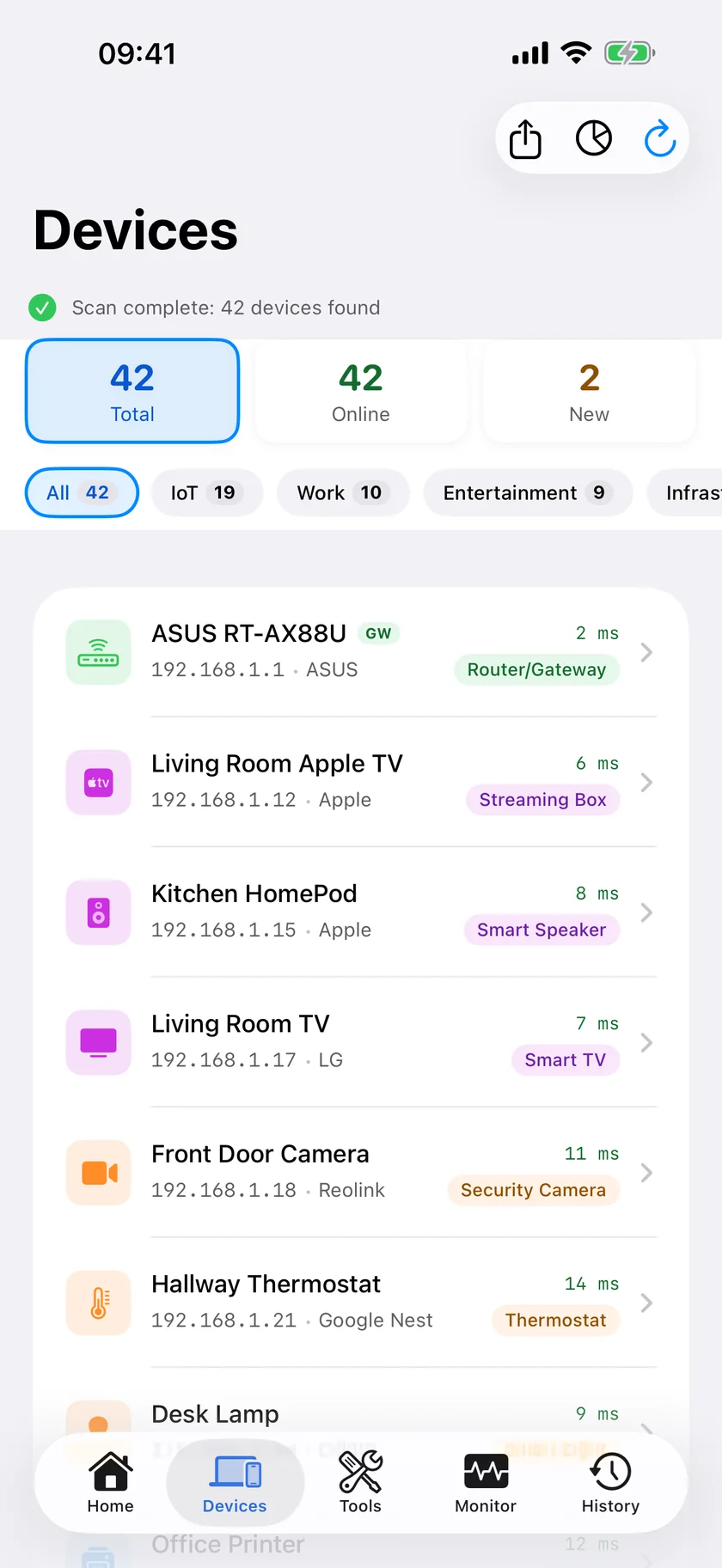
Then walk the list and name things. A device called "espressif" is a smart plug or a sensor; one called "HP" in the corner is the printer. Anything you cannot identify is worth five minutes now rather than a year of appearing in every report as a question mark. The Bonjour Browser helps here. It groups what it finds by service, under a plain name where it knows one, so a device under Printer is a printer, one under Windows File Sharing is a file server, and one under SSH is something somebody set up deliberately.
The LAN scan and the Network Report PDF are both free on the iPhone, no account needed. Get PingKit for iPhone
Step 2: Export the Report
Go to Reports and create a Network Report. This is free on the iPhone, with no subscription. The PDF contains:
- Connection facts: connection type, local IP, gateway, subnet mask, DNS provider and servers, and whether DNS is encrypted.
- Devices: the scanned inventory, up to 200 entries.
- Speed tests: your recent results, up to 40.
- Latency, with packet loss, up to 40 samples.
- Security summary: the score and findings from your last security checkup.
- Certificates and uptime targets you have added.
- Events: the recorded network events, up to 120.
- With Guardian: the cameras your last Security Scan found on this network, and the port forwards your router last reported to Router mode.
What it does not contain, so nobody is surprised: there is no open-port section. Port scanning is a separate tool in the app and its results are not part of this document.
Name the file with the date and the site. Two files three months apart are worth more than one perfect one.
Step 3: Keep It Current Without a Spreadsheet
Documentation decays. The realistic options are a calendar reminder every quarter, or something that keeps the record for you.
The free PingKit Agent for Mac, running on any Mac in the office that stays awake, scans every five minutes and keeps a device list with first and last seen times, a timeline of internet outages and device arrivals, and a scheduled speed test. That turns your quarterly snapshot into a continuous record with no discipline required, and it costs nothing on the Mac.
PingKit Guardian, $2.99 a month or $24.99 a year on iPhone or Mac, brings the Agent's device history and internet events to the iPhone, where you read them in the Devices and Monitor tabs. Be clear about what that does and does not change: the PDF the phone exports is still built from the phone's own scan and its own event log, so for a document drawn from continuous observation, export the Agent's own report on the Mac. Guardian Plus, $9.99 a month or $79.99 a year on iPhone, adds two things a business specifically needs: a signed compliance PDF, an evidence pack for your monitored certificates and uptime targets with a signature an auditor can verify has not been edited, and scheduling with your own organisation name on the report.
One thing to be clear about on scheduling: iOS cannot build a report in the background. A schedule tells you when the next report is due and prepares it the next time you open the app. The app says so on the screen, and so does this page.
Step 4: The Three Things Worth Fixing Once You Can See Them
- Devices nobody can name. Every unidentified device on a business network is either an asset you forgot or something that should not be there. The list makes the question askable.
- A guest network that is not separate. If visitors join the same network as the accounts machine and the NAS, that is the cheapest fix on this page: How to Set Up a Guest WiFi Network.
- Certificates with no owner. The renewal that lapses is always the one nobody was watching. Cert Monitor warns at 30, 14, 7 and 1 days, based on readings from the device you added the certificate on: hourly on a Mac running PingKit Agent while it is awake, or each time you open Cert Monitor on iPhone. One domain is free; on a Mac, its alerts need Guardian.
If a client questionnaire or a certification is what brought you here, the related reading is ISO 27001 Certificate Evidence, and for the day the connection itself is the argument, Is Your Business WiFi Down? A No-IT-Department Checklist.
Honest Limits
- A LAN scan finds what answers on the subnet you are joined to, up to 1,022 addresses (a /22 or smaller); on a larger network PingKit scans the 254 addresses around your own device and tells you so. Devices on another VLAN, on a guest network, or asleep at the time will not appear.
- On iOS 17 to 26, iOS does not give apps the hardware address of most devices, answering with a placeholder, so the phone identifies most devices by what they publish about themselves, and a device that publishes nothing appears as an address alone; on iOS 27 and later the phone shows most devices' MAC addresses and chip makers as well. The Mac Agent does see real MAC addresses on macOS 15 and 26, and Agent 3.3.0 or later reads them on macOS 27.
- The Agent's five-minute scan is its mains-power default. On battery it drops to fifteen minutes.
- The report caps its sections: 200 devices, 40 speed tests, 40 latency samples, 120 events. Large networks will be truncated.
- The latency section carries packet loss only where your event log holds ping runs. Latency recovered from other sources appears without a loss figure.
- The iPhone's report is built from what the phone has recorded. The Mac Agent's report is the one that carries the Agent's timeline.
- The network report has no open-port inventory.
- iOS cannot generate reports in the background. A schedule reminds and prepares; it does not send.
- The compliance report is deliberately produced in English, because the control identifiers it references are English.
- PingKit is a diagnostic tool for a network you own. It is not an asset management system and does not manage devices.
Frequently Asked Questions
How do I document a small business network without IT staff?
Scan the network from a phone, name every device you can identify, and export a dated PDF. PingKit's LAN scan plus its free Network Report does this in about ten minutes, and repeating it quarterly gives you a before and after that is more useful than one perfect diagram.
Is the PingKit network report free?
The Network Report PDF is free on the iPhone with no subscription. With Guardian it also lists the cameras your last Security Scan found and the port forwards your router last reported to Router mode; the Mac Agent's history goes into PingKit Agent's own report on the Mac, not this one. Guardian Plus, $9.99 a month on iPhone, adds a signed compliance PDF for auditors and scheduling with your own organisation name.
What goes into the network report?
Connection facts including gateway, subnet and DNS; the device inventory; recent speed tests; latency, with packet loss where your event log holds ping runs; the security summary; certificates and uptime targets you have added; and recorded network events. With Guardian, it also lists the cameras your last Security Scan found and the port forwards your router last reported to Router mode. There is no open-port section.
Can PingKit produce reports automatically?
Not on iOS, because the system does not allow an app to build documents in the background. A schedule on Guardian Plus tells you when the next report is due and prepares it the next time you open the app.
What do I do about devices I cannot identify?
Check what they advertise in the Bonjour Browser, which usually names the category even when the device name is unhelpful, and check the brand PingKit resolved from what the device publishes about itself. Anything still unexplained on a business network deserves a five-minute answer now rather than a year as a question mark.
Get the inventory out of your head and into a PDF.
Free to download. Guardian is $2.99 a month or $24.99 a year on iPhone or Mac; Guardian Plus, which adds the signed compliance PDF and scheduling, is $9.99 a month or $79.99 a year on iPhone. Every plan starts with a 1-week free trial for new subscribers.
Download PingKit for iPhone