Is Your Network AI-Ready? What Every Smart Home Owner Should Know
Take a moment and try to count every device connected to your WiFi right now. Your phone, your laptop, your tablet. The smart TV. The streaming stick. The smart speaker in the kitchen and the one in the bedroom. The security camera. The robot vacuum. The smart thermostat. The smart light bulbs - each one is its own device on your network.
If you got to 10, you're probably forgetting a few. The average smart home in 2026 has between 15 and 25 connected devices, and that number is climbing every year. Every one of those devices connects to your router, talks to the internet, and could be a potential security weakness.
Most people have no idea what half of them are doing.
The Smart Home Explosion
Five years ago, the typical home had a router, some phones, some laptops, maybe a smart TV. That was the network. Today, the list looks more like this:
- Phones and tablets
- Laptops and desktops
- Smart TVs and streaming devices
- Smart speakers and voice assistants
- Security cameras and video doorbells
- Smart light bulbs and light switches
- Robot vacuums and smart appliances
- Smart thermostats and HVAC controllers
- Smart locks and garage door openers
- Game consoles and VR headsets
- Smart plugs and power strips
- Fitness trackers and health monitors on WiFi
Each of these is a small computer running software, connected to your network, and communicating with servers on the internet. Some of them are made by major companies with dedicated security teams. Some of them are made by companies you've never heard of, running firmware that hasn't been updated since the day it shipped.
The Security Risks You Can't See
Here's the uncomfortable truth about IoT devices: most of them prioritise convenience over security. They're designed to be set up quickly and work immediately. Security is an afterthought, if it's a thought at all.
Common issues with smart home devices include:
- Default credentials - many devices ship with default usernames and passwords that are publicly known. If you never changed them, anyone who knows the default can access the device
- Unencrypted communication - some devices send data without encryption, meaning anyone on your network can see what they're transmitting
- Open management ports - devices that expose Telnet, HTTP admin panels, or other management interfaces to your entire network
- No automatic updates - many IoT devices don't update their firmware automatically, leaving known security vulnerabilities unpatched for years
- Excessive data collection - some devices phone home more than they need to, sending usage data, voice recordings, or video to cloud servers
The problem isn't that any single device is catastrophically insecure. The problem is that you have 20 of them, you can't easily see what they're all doing, and one compromised device can be used as a stepping stone to everything else on your network.
Real-world example: In 2023, a widely reported attack used compromised smart home cameras to launch distributed denial-of-service attacks. The camera owners had no idea their devices had been hijacked. The cameras were still working normally - they were just also attacking websites in the background.
Why Most People Don't Monitor Their Network
The tools to monitor a home network have existed for years. Port scanners, network mappers, traffic analysers. But they've always had the same problem: they're built for professionals. The output is technical, the interfaces are complex, and the learning curve is steep.
When your network scanner tells you there are 23 devices connected but presents them as a list of IP addresses and MAC address prefixes, it's not particularly helpful unless you can mentally map "Espressif Inc. at 192.168.1.47" to "the smart plug in the living room."
This is exactly where AI changes the game.
How AI Identifies and Categorises Every Device
AI-powered network scanning doesn't just find devices - it identifies them. By analysing multiple signals from each device (its manufacturer, open ports, advertised services, network behaviour), AI can determine what a device actually is and present it by name instead of by MAC address.
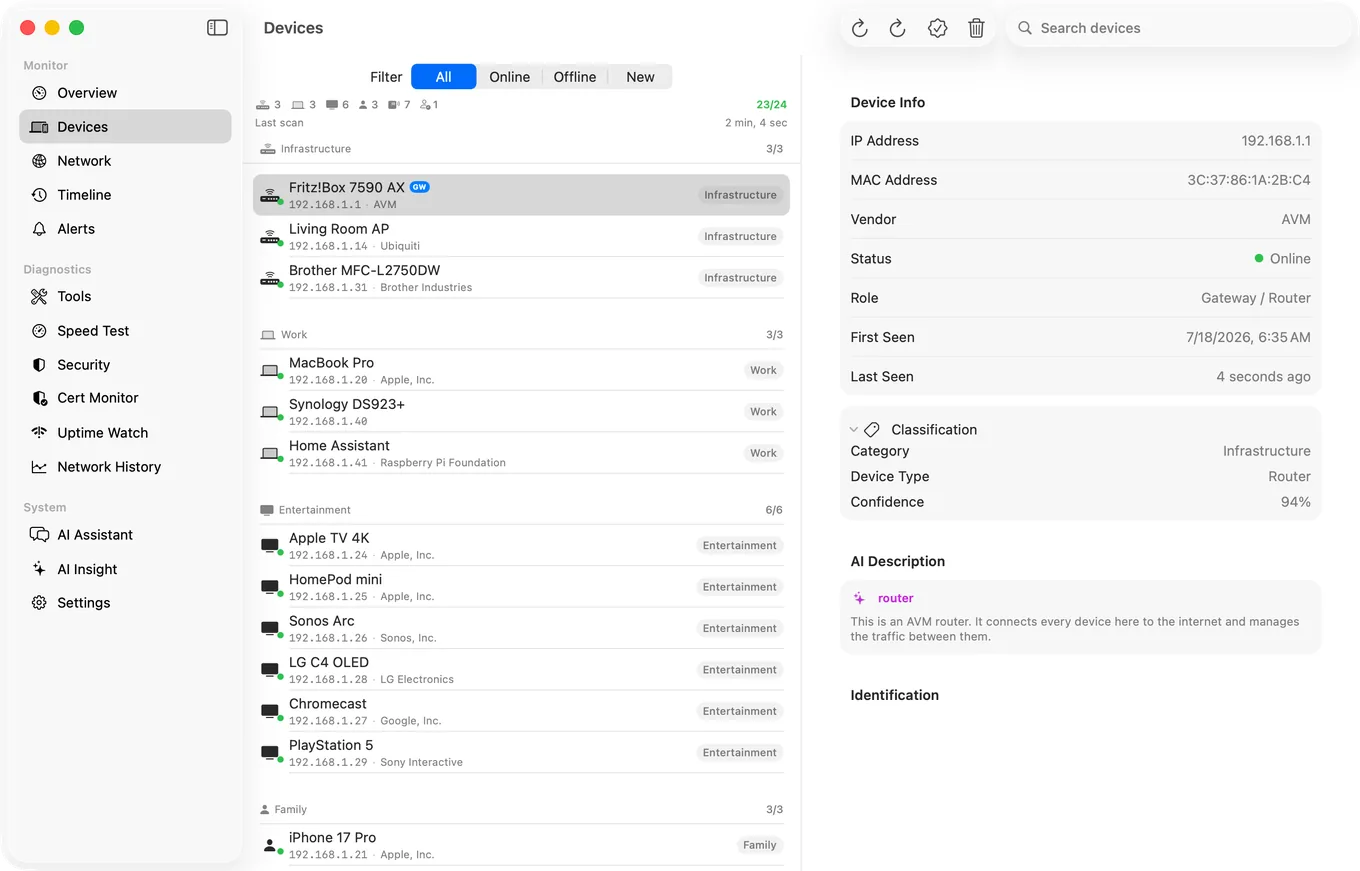
Instead of seeing this:
- 192.168.1.12 - Shenzhen Bilian Electronic (A4:CF:12:xx:xx:xx)
- 192.168.1.23 - Espressif Inc. (24:6F:28:xx:xx:xx)
- 192.168.1.34 - Amazon Technologies Inc. (FC:65:DE:xx:xx:xx)
You see this:
- 192.168.1.12 - Xiaomi Robot Vacuum
- 192.168.1.23 - Smart Plug (Tuya-based)
- 192.168.1.34 - Amazon Echo (4th Gen)
That's the difference between a list of data and a list of answers. When you can see every device by name and type, you can immediately spot something that doesn't belong.
The Importance of Regular Security Scans
PingKit's network security scan runs twenty checks against your own network and returns each finding with a severity and the specific change that clears it, on iPhone and on the Mac.
Identifying your devices is step one. Step two is checking them for security issues. A proper security scan examines each device for:
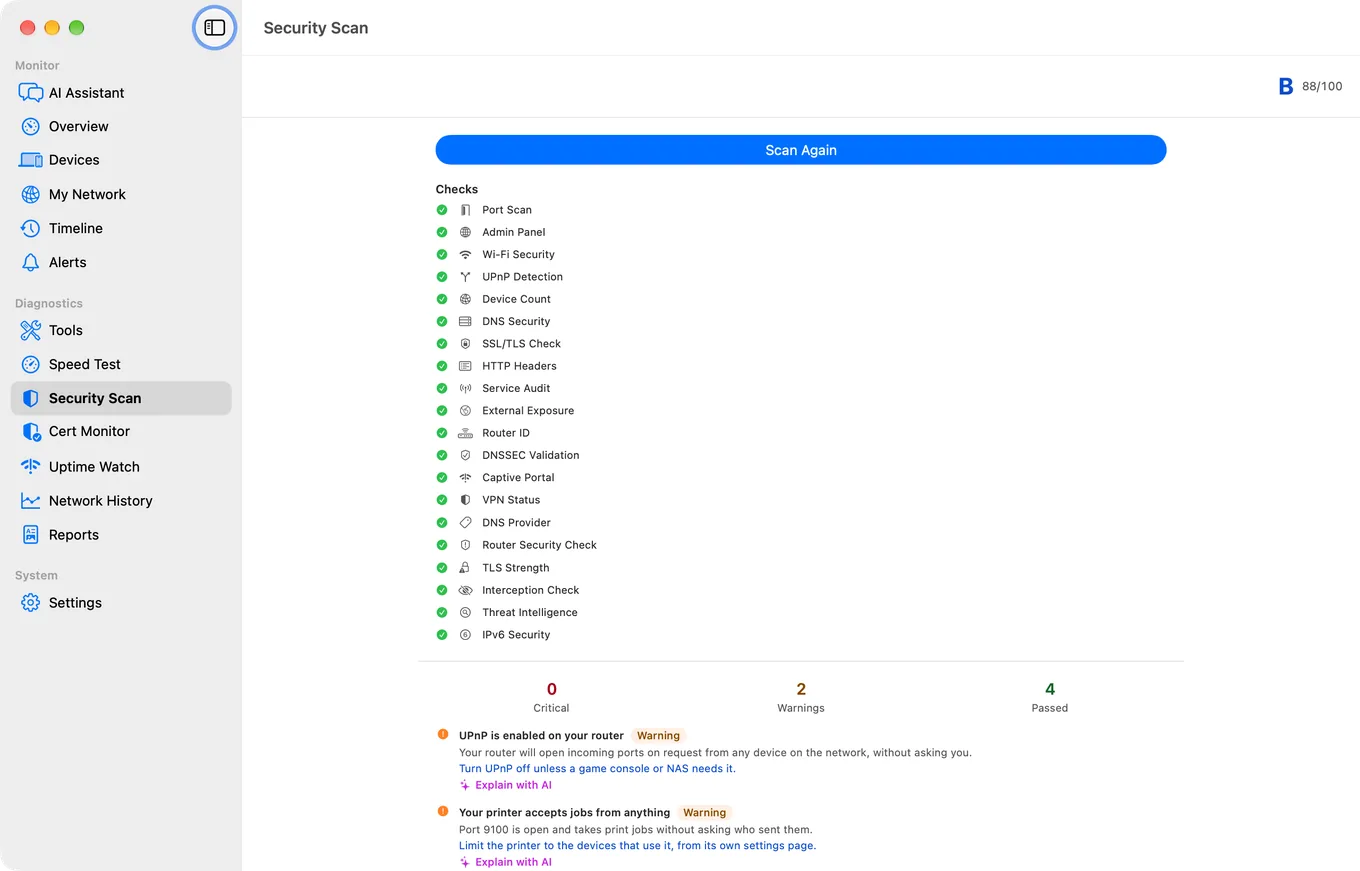
- Open ports that shouldn't be open
- Services running insecure protocols
- Devices exposing admin interfaces to the network
- Weak or missing encryption
- Software banners with a public exploit history
The problem with manual scans is that they're a snapshot. Your network looks secure today, but what about when your kid connects a new device tomorrow, or when a firmware update changes a device's configuration overnight? Networks change constantly, and a scan you ran last week may not reflect what's happening right now.
Continuous Monitoring with PingKit Guardian
This is the problem PingKit Guardian was built to solve. Guardian runs on your Mac as a lightweight menu bar app, scanning your network around the clock. It doesn't just check once - it watches continuously.
Here's what continuous monitoring gives you:
Instant Intruder Alerts
The moment an unfamiliar device connects to your WiFi, Guardian notices. It sends you an alert with whatever it can determine about the device - manufacturer, type, and any services it's running. If it's your new smart light bulb, you can dismiss it. If it's something you don't recognise, you know to investigate immediately.
24/7 Security Scoring
Every device on your network is continuously evaluated against dozens of security rules and assigned a risk level, from Secure to Critical. If a device's risk level rises - because a new port opened, or a service changed - you're notified. You don't have to remember to scan. Guardian does it for you.
Network Timeline
Guardian keeps a detailed log of everything that happens on your network. Devices joining and leaving, security score changes, speed test results, alerts. When something goes wrong, you can scroll back through the timeline and see exactly what changed and when.
AI-Powered Everything
With PingKit 1.3.2, Guardian's AI features tie everything together. New device detected? AI classifies it automatically. Security issue found? AI explains it in plain English and generates a fix-it guide. Scan completed? AI writes you a summary. You get the intelligence of a professional network audit without hiring anyone.
Try Guardian free for a week. PingKit Guardian includes a free trial so you can see continuous monitoring in action before subscribing. $2.99/month or $24.99/year after the trial.
Five Things You Can Do Today
You don't need to overhaul your entire network to improve security. Start with these five steps:
- Scan your network - find out how many devices are actually connected. You'll probably be surprised
- Identify every device - if you can't name a device on the list, investigate it. AI classification makes this much easier
- Change default passwords - if any device still has its factory default credentials, change them now
- Run a security scan - check for open ports, insecure services, and configuration issues across all your devices
- Set up continuous monitoring - a one-time scan is good, but ongoing monitoring is how you catch problems before they become incidents
Your home network is the backbone of your digital life. Your work, your entertainment, your security cameras, your front door lock - they all run through it. Knowing what's connected and whether it's secure isn't optional anymore. It's basic digital hygiene.
Related Articles
- How AI Makes Your Home Network Smarter
- PingKit 1.3.2: AI Network Intelligence
- How to Detect Unknown Devices
- Network Security Scan for iPhone
Take Control of Your Smart Home Network
Download PingKit to scan, identify, and secure every device on your WiFi. 19 free tools on iPhone, plus AI-powered Guardian monitoring on Mac. Know exactly what's on your network.
Download Free on the App Store